|
Paypal Customers
|
|
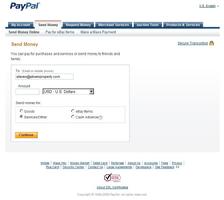
- Go to Paypal website.
- Sign into your Paypal account.
- Click on SEND MONEY.
- Click on SEND MONEY ONLINE.
- Enter TO: steven@ptownproperty.com.
- Enter AMOUNT of payment you wish to send.
- Choose USD-US Dollars for the currency.
- Choose SERVICES/OTHER to send money for.
- Click on CONTINUE.
- Complete Online Instructions.
|
Non-Paypal Customers
|
|
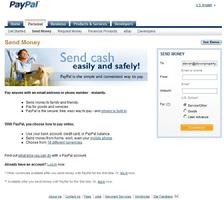
- Go to Paypal website.
- Click on SEND MONEY.
- Click on SEND MONEY ONLINE.
- Enter TO: steven@ptownproperty.com.
- Enter FROM: (your e-mail address).
- Enter AMOUNT of payment you wish to send.
- Choose SERVICES/OTHER to send money for.
- Click on CONTINUE.
- Complete Online Instructions.
|
|